
Emerald Firenze1.4.1 - Google Play
You'll be able to see results in few seconds.
Publisher Description
This app will no longer be available as of November 1, 2023, as Emerald Sequoia LLC is shutting down. Please see our blog post linked from our support page listed here.
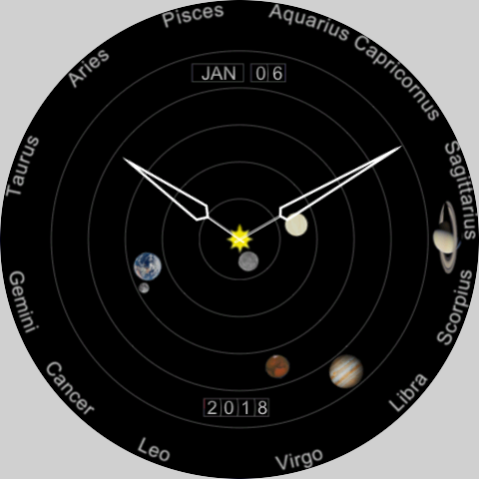
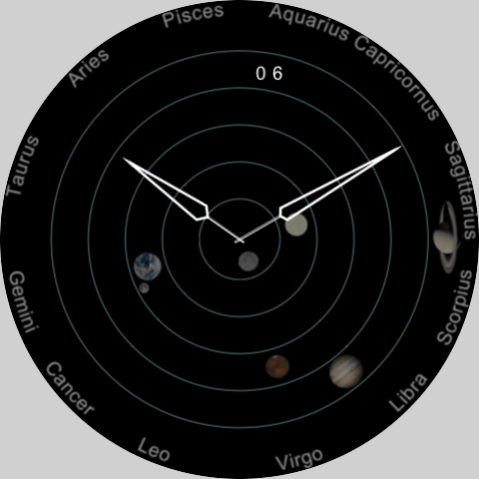
The WearOS watch face Emerald Firenze, an analog watch face, is a planetary orrery which shows a heliocentric view of the solar system (as it was known in Galileo's day, with only 6 planets) plus the Earth's Moon.
The view is from far above the Sun's north pole; the planets move counter-clockwise as time moves forward (and the Moon similarly moves counter-clockwise around the Earth). Only the angular positions of the planets are represented; the relative distances and sizes are wildly out of scale (as they must be in a practical sized display: If Saturn's orbit was shown at the same scale as the Earth's the watch would have to be about 5x larger than it is. If the Sun image was shown at the same scale as the Earth it would be almost 5x larger than the whole screen. If the Earth-Sun distance was shown at the same scale is the Earth image it would be more 10,000x larger!).
The constellations of the zodiac are marked around the perimeter of the face. The position of each planets is correct with respect to them from the perspective of the Sun. The angular positions of the other planets with respect to the Earth can be estimated only very approximately with this display since it is so greatly out of scale. (For that purpose, use Emerald Venezia.)
More information is available at the website listed.
About Emerald Firenze
The company that develops Emerald Firenze is Emerald Sequoia LLC. The latest version released by its developer is 1.4.1.
To install Emerald Firenze on your Android device, just click the green Continue To App button above to start the installation process. The app is listed on our website since 2022-11-05 and was downloaded 0 times. We have already checked if the download link is safe, however for your own protection we recommend that you scan the downloaded app with your antivirus. Your antivirus may detect the Emerald Firenze as malware as malware if the download link to com.emeraldsequoia.chronometer.firenze is broken.
How to install Emerald Firenze on your Android device:
- Click on the Continue To App button on our website. This will redirect you to Google Play.
- Once the Emerald Firenze is shown in the Google Play listing of your Android device, you can start its download and installation. Tap on the Install button located below the search bar and to the right of the app icon.
- A pop-up window with the permissions required by Emerald Firenze will be shown. Click on Accept to continue the process.
- Emerald Firenze will be downloaded onto your device, displaying a progress. Once the download completes, the installation will start and you'll get a notification after the installation is finished.
Program Details
System requirements
Download information
Pricing
Version History
version 1.4.1
posted on 2022-11-05
Support latest development environment
version 1.2.1
posted on 2021-09-19
Support for Samsung Galaxy Watch 4
version 1.0.4
posted on 2019-06-02
Fix startup crash on Tag Heuer Connected devices
Disclaimer
Official Google Play Link
We do not host Emerald Firenze on our servers. We did not scan it for viruses, adware, spyware or other type of malware. This app is hosted by Google and passed their terms and conditions to be listed there. We recommend caution when installing it.
The Google Play link for Emerald Firenze is provided to you by apps112.com without any warranties, representations or guarantees of any kind, so access it at your own risk.
If you have questions regarding this particular app contact the publisher directly. For questions about the functionalities of apps112.com contact us.
